프로그램에서 1초에 한 번씩 주기적인 작업을 수행해야 하는 경우 QTimer 클래스를 사용합니다.
57-1 예제1: ex56
| import sys import datetime from PyQt5.QtWidgets import (QApplication, QMainWindow) from PyQt5.QtCore import QTimer class MyApp(QMainWindow): def __init__(self): super().__init__() self.initUI() def initUI(self): self.timer = QTimer(self) self.timer.start(1000) # 1초에 한번 타이머 작동 self.timer.timeout.connect(self.timeout) self.setGeometry(300, 300, 300, 200) self.setWindowTitle("QTimer") self.show() def timeout(self): now = datetime.datetime.now() self.statusBar().showMessage(str(now)) if __name__ == "__main__": app = QApplication(sys.argv) win = MyApp() sys.exit(app.exec_()) |
57-2 설명
| self.timer = QTimer(self) self.timer.start(1000) # 1초에 한번 타이머 작동 self.timer.timeout.connect(self.timeout) |
1초에 한 번 timeout 시그널이 발생하도록 하고 timeout 시그널에 timeout 슬롯을 등록합니다.
| def timeout(self): now = datetime.datetime.now() self.statusBar().showMessage(str(now)) |
self.timeout 메서드에서는 현재 시간을 얻어온 후 이를 문자열로 MainWindow 상태바에 출력합니다.
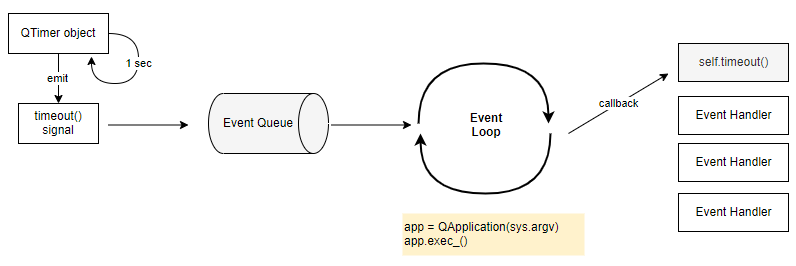
QTimer 객체는 1초에 한 번씩 주기적으로 timeout 시그널을 발생시킵니다. 발생된 timeout 시그널은 Event Queue에 입력되고 Event Loop에 의해서 등록된 슬롯 (이벤트 핸들러 메서드)인 self.timeout에 의해 처리됩니다.
57-3 결과

57-4 예제2
5초 후에 특정 작업을 한 번 수행하는 경우 QTimer 클래스의 singleShot 메서드를 이용해서 구현할 수 있습니다.
singleShot 메서드의 첫 번째 인자는 msec 입니다., 이 값에 5000을 입력하면 5초 후에 두 번째 인자의 메서드를 호출하게 됩니다.
| import sys import datetime from PyQt5.QtWidgets import (QApplication, QMainWindow, QPushButton, QLabel) from PyQt5.QtCore import QTimer class MyApp(QMainWindow): def __init__(self): super().__init__() self.initUI() def initUI(self): self.btn = QPushButton("emitter", self) self.btn.move(10, 10) self.btn.clicked.connect(self.btn_clicked) self.lbl1 = QLabel(self) self.lbl1.move(10, 60) self.lbl1.resize(200, 30) self.lbl2 = QLabel(self) self.lbl2.move(10, 90) self.lbl2.resize(250, 30) self.setGeometry(300, 300, 300, 200) self.setWindowTitle("Qtimer singleShot") self.show() def btn_clicked(self): QTimer.singleShot(5000, self.emit) self.lbl1.setText("발사 " + str(datetime.datetime.now())) def emit(self): self.lbl2.setText("5초 후 발포하다 " + str(datetime.datetime.now())) if __name__ == "__main__": app = QApplication(sys.argv) win = MyApp() sys.exit(app.exec_()) |
57-5 예제3
윈도우를 실행한 후 5초 후에 자동으로 종료되는 프로그램을 만듭니다.
생성자에서 QTimer의 singleShot 메서드를 사용해서 5초 후에 종료되도록 슬롯을 지정하면 됩니다.
| import sys import datetime from PyQt5.QtWidgets import (QApplication, QMainWindow) from PyQt5.QtCore import QTimer class MyApp(QMainWindow): def __init__(self): super().__init__() QTimer.singleShot(1000 * 5, QApplication.instance().quit) if __name__ == "__main__": app = QApplication(sys.argv) win = MyApp() win.show() sys.exit(app.exec_()) |
'프로그래밍 > PyQt5 GUI' 카테고리의 다른 글
| 59. 이벤트 루프 (0) | 2021.08.10 |
|---|---|
| 58. 타이머와 스레드 (0) | 2021.08.09 |
| 35. QPlainTextEdit (0) | 2021.08.09 |
| 56. 텍스트 그리고 (drawText) (0) | 2021.07.30 |
| 55. 파이 그리기 (drawPie) (0) | 2021.07.30 |


