QTextEdit Class는 plain text와 rich text을 모두 지원하는 편집기입니다. (QTextEdit 공식 문서) 참고
34-1 예제: ex33
| import sys from PyQt5.QtWidgets import (QApplication, QWidget, QLabel, QTextEdit, QVBoxLayout) class MyApp(QWidget): def __init__(self): super().__init__() self.initUI() def initUI(self): self.lbl1 = QLabel('Enter your sentence:') self.te = QTextEdit() self.te.setAcceptRichText(False) self.lbl2 = QLabel('The number of words is 0') self.te.textChanged.connect(self.text_changed) vbox = QVBoxLayout() vbox.addWidget(self.lbl1) vbox.addWidget(self.te) vbox.addWidget(self.lbl2) vbox.addStretch() self.setLayout(vbox) self.setWindowTitle('QTextEdit') self.setGeometry(300, 300, 300, 200) self.show() def text_changed(self): text = self.te.toPlainText() self.lbl2.setText('The number of words is ' + str(len(text.split()))) if __name__ == '__main__': app = QApplication(sys.argv) ex = MyApp() sys.exit(app.exec_()) |
34-2 설명
| self.lbl1 = QLabel('Enter your sentence:') self.te = QTextEdit() self.te.setAcceptRichText(False) self.lbl2 = QLabel('The number of words is 0') |
- QTextEdit() 클래스를 이용해서 텍스트 편집기 하나를 만듭니다.
- setAcceptRichText를 Flase로 하면, 모두 Plain Text로 인식합니다.
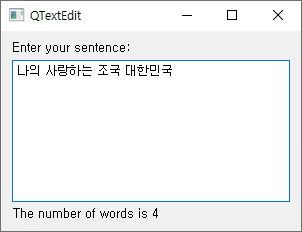
- lbl2 라벨은 단어수를 표시합니다.
| self.te.textChanged.connect(self.text_changed) |
- 텍스트 편집기의 텍스트가 수정될 때마다 text_changed 메서드가 호출됩니다.
| vbox = QVBoxLayout() vbox.addWidget(self.lbl1) vbox.addWidget(self.te) vbox.addWidget(self.lbl2) vbox.addStretch() self.setLayout(vbox) |
- 수직 박스 레이아웃을 이용해서, 두 개의 라벨과 하나의 텍스트 편집기를 수직 방향으로 배치합니다.
| def text_changed(self): text = self.te.toPlainText() self.lbl2.setText('The number of words is ' + str(len(text.split()))) |
- text_changed 메서드가 호출되면, toPlainText() 메서드를 이용해서 텍스트 편집기 (self.te)에 있던 텍스트를 text 변수에 저장합니다.
- split() 메서드는 문자열의 단어들을 리스트 형태로 바꿔줍니다.
- len(text.split())은 text의 단어수입니다.
- setText()를 이용해서 두 번째 라벨에 단어수를 표시합니다.
34-3 결과
'프로그래밍 > PyQt5 GUI' 카테고리의 다른 글
| 37. QInputDialog (0) | 2021.07.27 |
|---|---|
| 36. QTableWidget (0) | 2021.07.27 |
| 33. QTextBrowser (0) | 2021.07.27 |
| 32.QDateTimeEdit (0) | 2021.07.27 |
| 31. QTimeEdit (0) | 2021.07.27 |


